Moviebox APK for Android
Enjoy movies and TV shows with Moviebox on Android. Explore a clean streaming experience, easy navigation, HD playback, and convenient download options.
Moviebox
Moviebox makes streaming free and accessible. It is a new and advanced streaming application. This app contains different movies, TV shows, web series, and seasons. You can also watch your favourite anime content for free on this app. Some users love watching Hollywood, Bollywood, and South Indian content. This app also contains content from different film industries to bring more entertainment. Watching your favourite movies or seasons in 4K quality without any subscription is possible with this movie app.
You can use it on your device with 2GB RAM and proper storage. It also works on low-end devices, but users face different problems with such devices. The app is small in size and does not put a heavy load on the battery or on the device. Although it is a third-party streaming application, its privacy and safety features are next level. It keeps the user’s private information safe and secure. Download its APK file and get free access to an unlimited entertainment world.
Moviebox app
Are you a true lover of watching movies and TV shows in your leisure time? And you are unable to find any streaming app that provides free access to movies and other content. Then your wait is over, and there is an app called Moviebox app. This app contains all your favourite content such as Hollywood movies, Bollywood series, and many more. You can watch many of them for free. A subscription or monthly fee is not needed to use this app. Without a subscription, you can access all the premium features. It works smoothly on average internet speed. And it also does not show any type of buffering with a good device.
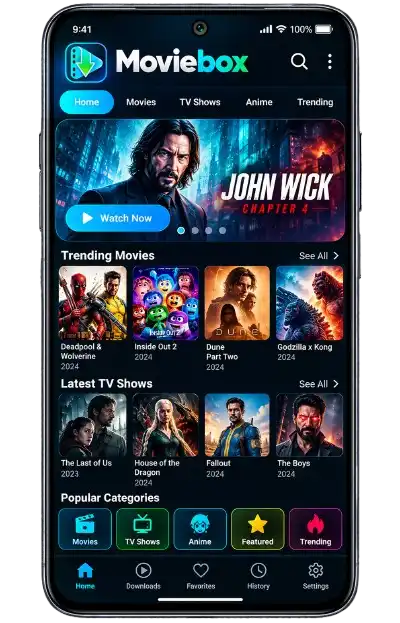
The appearance of the app looks very professional. It is easy to navigate to your favourite movie or TV show due to the search button. Every option is given with clear visibility and readability. You can also get guidance from video tutorials. There is also a team support option for resolving any queries about the app. The interface is very clear and friendly. There are separate categories for movies and TV shows. Different genres of content such as thriller, comedy, funny, suspense, and science fiction are available. After reading this guide, you will know about the features and other aspects of the app.
Why choose Moviebox APK?
Many streaming apps are now on the market. These include Netflix, Amazon Prime Video, and Hotstar. All of these are paid apps. There are also free streaming apps. But most of them do not provide the full content. These free streaming apps also crash or show different issues. In short, the performance of free streaming platforms is not good. Then there is a question about Movie box APK. This APK app is also free. Then how is it different from other free streaming apps? Users choose this app for the following reasons.
- Find something to watch without endless scrolling.
- Keep your favorite picks close at hand.
- Explore titles based on your mood.
- Move between movies and shows with ease.
- Check new releases in one place.
- Pick content from different categories.
- Search directly when you know the title.
- Continue exploring whenever you have free time.
- Enjoy a straightforward viewing setup.
- Use the app without a complicated learning curve.
- Discover titles outside your usual choices.
- Turn short breaks into quick entertainment.
Moviebox premium version
The premium version offers 4K ultra video quality and subtitles. Ads and any third-party links are blocked in the premium version. You can watch unlimited movies or series in a single day. It is locked in free version. The subscription is not very costly, unlike any other paid streaming apps. You can afford it easily. There are also rewards for spending time on the app and doing tasks. You can use these rewards to unlock the premium features. With this premium version, users can download unlimited videos. There is a comparison between the free version and the premium version of Moviebox.
Key Features
Large movie and show library.
There is a large content library. From which you can find a variety of movies, TV shows, and other content. It contains movies from every film industry and from all different genres. Therefore, users with different tastes use this app to watch their favourite movies and TV shows. It contains content from different regions of the world. Therefore, it has worldwide popularity.
Simple browsing experience
The app is simple due to a clear and friendly interface. Therefore, browsing is very simple. You can search for any movie or TV show using the search button. Find any movie, season, or TV series by exploring the different categories of content. Find any option due to clear label and visibility. There are no hidden features or any type of complex coding.
Clear video playback
The video quality is the main thing a person consider during watching any TV show or series. You can find different video qualities in this app. Set the video quality according to your own preference. The video quality options range from 320 pixel to 4K. In the free version, you can watch movies in 720p.
Subtitle support
Subtitles are actually written forms of dialogue. When a character speaks the dialogue, this dialogue appears on the screen in written form. It is easy to understand the language. The subtitles are available in multiple languages in this app. In this way, you can watch the movie in any language. These subtitles help you understand dialogues in languages you don’t speak.
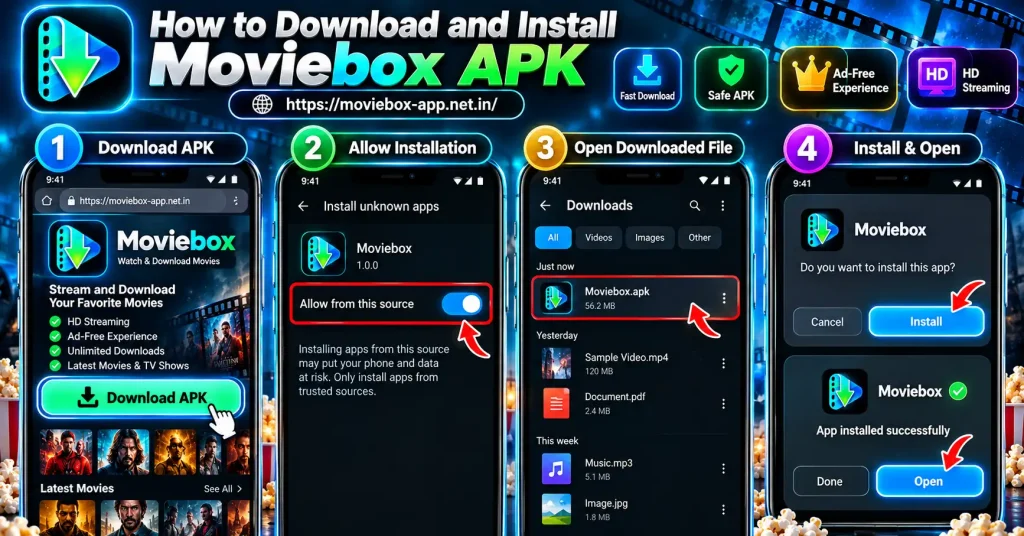
Install MovieBox APK app on Android
Android installation is quite simple. You only need the APK file and enough storage. Check your Android version first. A stable internet connection is also helpful.
- Download the APK from a reliable source.
- Open your phone’s Downloads folder.
- Find the downloaded APK file.
- Tap the file to begin.
- Allow unknown app installation if prompted.
- Return to the APK file.
- Tap Install.
- Wait for the setup to complete.
- Open the app from your app drawer.
If the APK fails to install, check the file. It may be incomplete or damaged. An older version can also cause issues. Remove it before trying again. Be careful with third-party APK files. Check the source first. Review the permissions before opening the app.
Install MovieBox on PC
The PC method is slightly different. Windows does not normally run Android APK files by itself. A browser is the simpler option. Open Chrome, Edge, or another supported browser. Visit a trusted MovieBox ph website. You can then access the available content from the browser. Want to use the Android version instead? An emulator can help. Install a reputable Android emulator on Windows. Open it after setup. Load the APK inside the emulator. Follow the instructions on the screen. Keep enough free storage on your PC. Good RAM also helps. Close unnecessary programs if the emulator feels slow.
Use Without Installation
You may not need to install anything. A supported web version can be opened directly in your browser. This saves device storage. It is also useful on shared PCs. You can access the service without installing an APK. Always check the website before using it. Avoid unknown pop-ups and suspicious download buttons.
MovieBox vs. Popular Streaming Apps
MovieBox online User Experience
A good streaming app should feel easy from the start. MovieBox online keeps the browsing experience simple. You can look around without much effort. The home screen helps you get started. You can browse different sections. You can also search for a title you already have in mind. Categories make things easier. They let you explore content by genre. This is helpful when you are not sure what to watch.
The viewing experience can vary. Your internet connection plays a big role. Your device also makes a difference. A stable connection can make playback smoother. Older phones may take longer to load. Closing background apps can sometimes help.
The interface also matters. Clear menus make navigation less confusing. You can move between sections without much trouble. Of course, every version may feel a little different. The layout can change. Available content can change too. It is worth checking the version you use before getting started.
MovieBox Latest Version Update
Regular updates can improve the overall experience. They may fix small bugs. They can also make the app more stable. The latest MovieBox version is 2.11.36. It was updated on September 8, 2026. The release mainly includes minor bug fixes. This version requires Android 7.0 or newer. It is listed in XAPK format. The reported file size is around 125.5 MB. An update can also bring small changes. Menus may look different. Some features may work differently after an update. Before updating, check your phone storage. Make sure the file is compatible with your device. A stable internet connection can also make the process easier. Version numbers may differ between MovieBox services. Not every website offers the same release. Always check the package name and version before installing an update.
How to Update the App?
- Check the version you have now.
- Visit the same trusted source.
- Look for a newer version.
- Download the latest APK file.
- Open the downloaded file.
- Allow the required permission.
- Tap Update when prompted.
- Let the process finish.
- Open the app after updating.
- Check if everything works normally.
- Keep some free storage on your phone.
- Use a stable internet connection.
- Avoid unknown or modified APK files.
- If the update fails, check the file again.
Compatibility and Requirements
Before installing the app, check your device first. This can prevent common setup problems. It also helps you choose the right version.
Compatibility
MovieBox mod APK mainly targets Android devices. The listed versions support Android 7.0 and newer. Older phones may not support the latest release. The APK can also depend on your processor. Different builds may support different device types. Check the APK details before downloading. PC users have another option. Windows does not normally run Android APK files directly. You can use a web browser or an Android emulator instead. Compatibility can change with new releases. Always check the requirements before updating.
Requirements
You do not need a high-end phone. A basic Android device can be enough for normal use.
- Android: Version 7.0 or newer.
- RAM: 2 GB or more is recommended.
- Storage: Keep at least 150 MB free.
- Processor: A supported ARM-based chipset.
- Internet: A stable connection for streaming.
- PC: A browser or compatible Android emulator.
The file size can change with each release. Keep some extra storage available. This gives the app room for updates and temporary files. Your internet speed also matters. A stronger connection can provide smoother playback. Device performance can affect loading times as well.
Having Trouble With MovieBox mod? Try These Simple Fixes
Pros & Cons
Pros
- Simple and clean layout.
- Easy content browsing.
- Many movie genres.
- Series are also available.
- Quick title search.
- Works across different devices.
- Browser use can save storage.
Cons
- Features can differ by version.
- The library may change.
- Some versions need manual updates.
- APK files need extra care.
- Older phones may feel slow.
- Streaming needs a stable connection.
- Some titles may vary by region.
Final Thoughts
MovieBox can be a simple choice for people who enjoy watching movies and series. It brings different types of content into one place. The clean layout can also make browsing easier. You can explore several genres. You can search for a title without much effort. Android users can install the APK when their device supports it. PC users have more than one option. Browser access is simple and saves storage. An Android emulator can also run the mobile version. However, users should stay careful. Always check the download source. Review app permissions before installation. Keep your device protected and updated. The experience can vary between versions. Content may also change over time. Your device and internet connection can affect playback.
FAQS
Conclusion
MovieBox provides a simple way for Android users to explore movies and TV shows through a clean and easy-to-use interface. Users can browse available content, check different categories, enjoy supported playback options, and follow simple steps to install the app. Before downloading any APK, it is always a good idea to check the app details, Android requirements, and installation instructions
